The reminder app for iPhone that sets itself.
Updot Reminders is part of Updot, the iPhone app for your habits, to-do list, reminders, calendar, notes and focus timer. Paste a message, type a line or say it once, and Updot sets the date, time and reminder for you. Repeating reminders come back every day, weekday, week or month, and place reminders ping you when you get close. You’ll find them in the To-do tab, next to your tasks.
Most reminders fail before they ever ring.
At 8:16 AM James texts Alex about an 11 AM kickoff. In most apps Alex would retype the time, pick an alert and hope he got it right, before his first coffee. Reminders either never get set, or they get lost among three apps and too many pings.
Typing every detail
You paste or say it. Updot fills in the date, time and when to remind you.
Three apps for one day
Reminders, tasks and calendar meetings sit in one list, in time order.
Too many pings
Updot stays quiet while you focus and never nags about a habit you’ve already done.
From a message to a reminder in three steps.
- 1
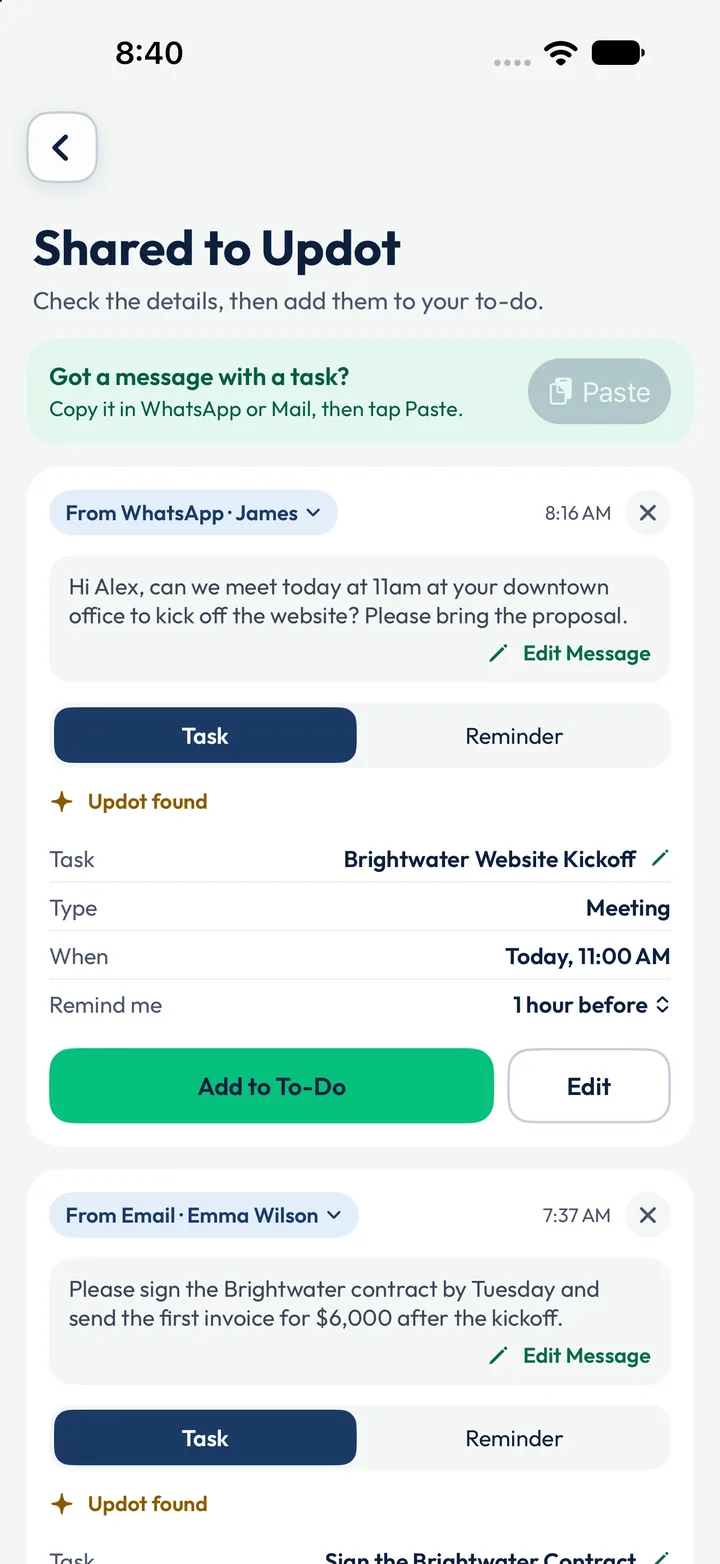
Share or paste the message
James’s WhatsApp, “can we meet today at 11 AM… please bring the proposal”, goes into Updot. Updot finds Brightwater Website Kickoff, Today 11:00 AM, remind me 1 hour before. Check it and tap Add to To-Do.
- 2
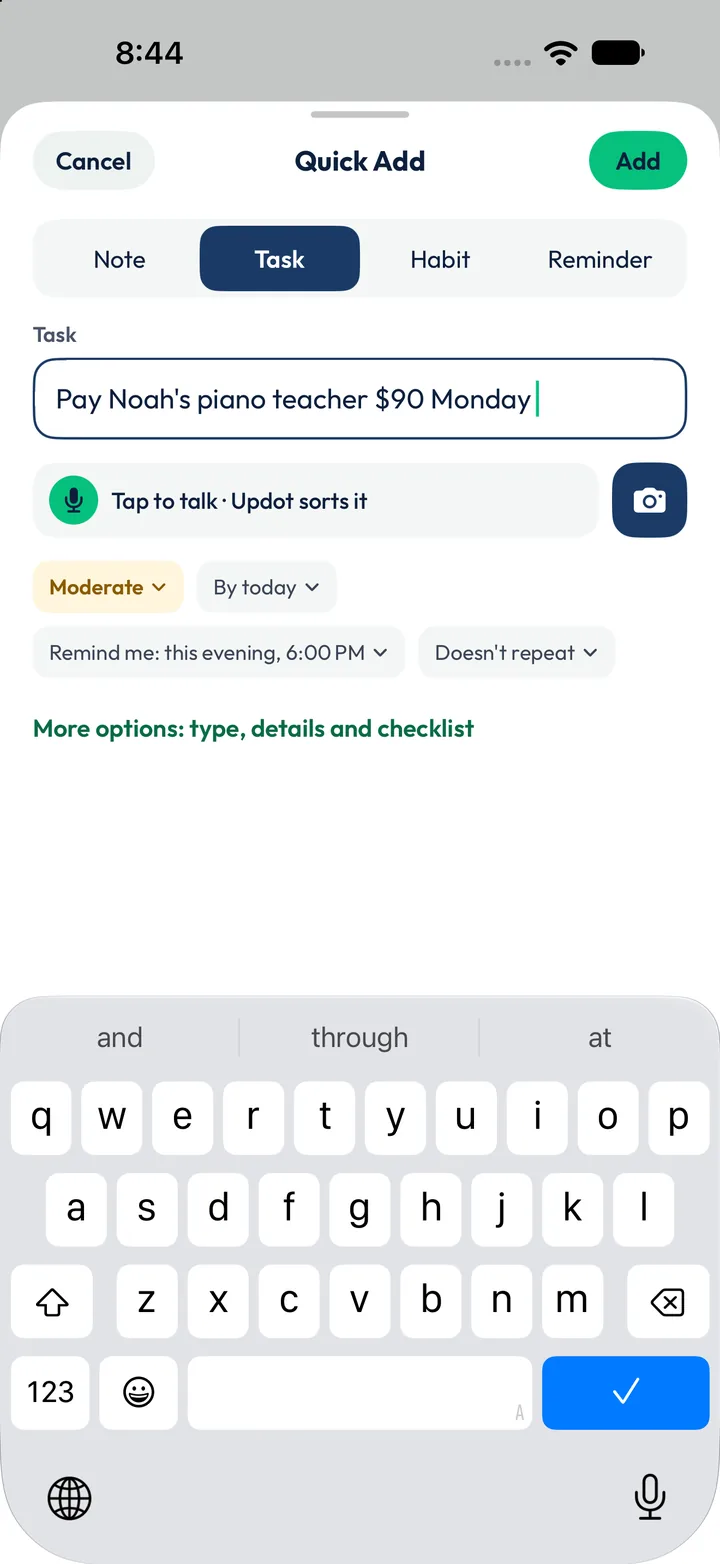
Or type it, or say it
In Quick Add, “Pay Noah’s piano teacher $90 Monday” gets a due date and “Remind me: this evening, 6:00 PM”. Tap to talk and Updot sorts it the same way.
- 3
Reminded at the right time, or place
Task reminders arrive before the task is due, repeating ones come back on schedule, and place reminders ping you when you get near the place you picked.
One list for everything Alex needs to remember.
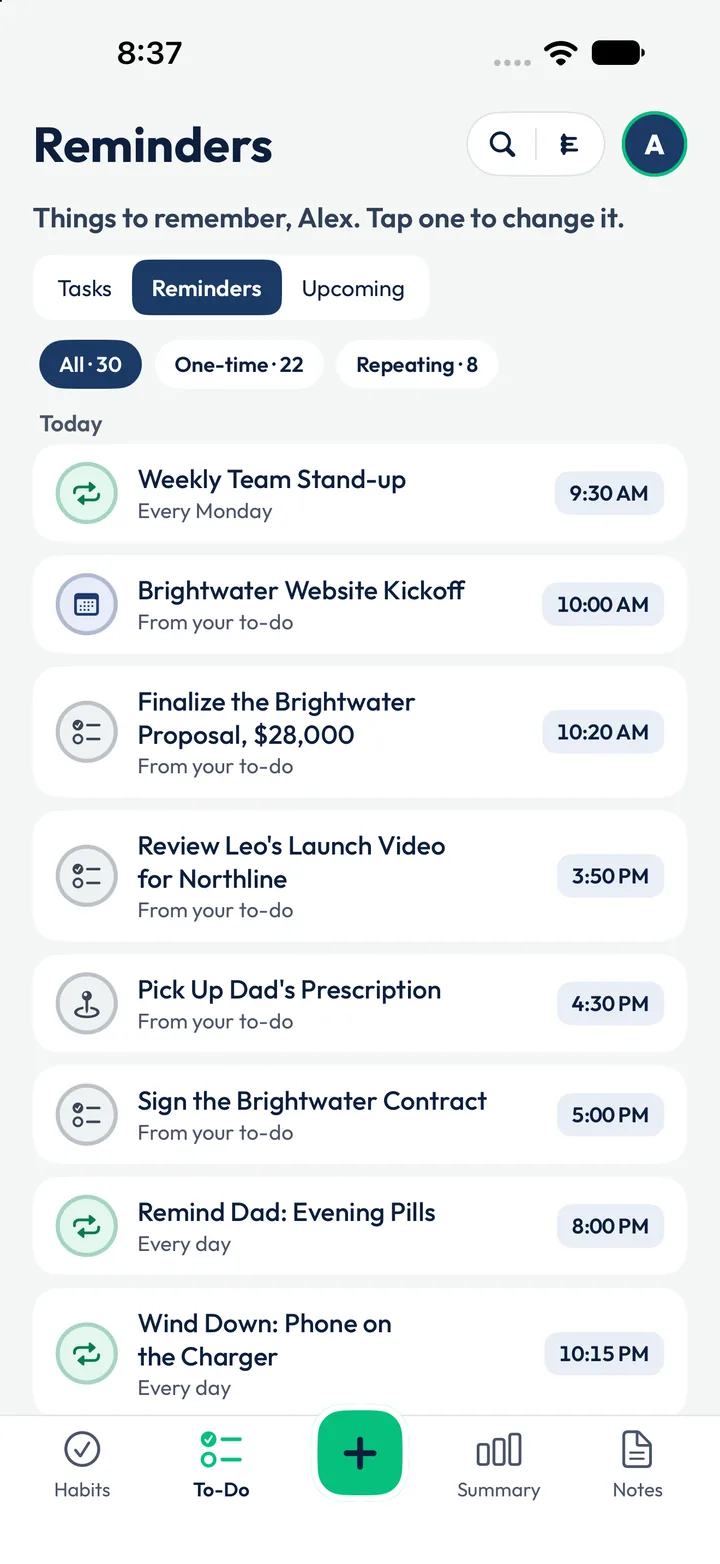
Repeating reminders and reminders from tasks sit together, in time order: 30 today, 8 of them repeating. Alex runs a small design studio in Austin and has two kids.
- Weekly Team Stand-upEvery Monday · 9:30 AMRepeating
- Brightwater Website Kickoff10:00 AM · 1 hour before the 11:00 AM meetingFrom WhatsApp
- Finalize the Brightwater Proposal10:20 AM · due at 10:30 AMFrom a task
- Pick Up Dad’s Prescription4:30 PM, and a ping near the pharmacy on Lamar BlvdPlace
- Sign the Brightwater Contract5:00 PMFrom email
- Remind Dad: Evening PillsEvery day · 8:00 PMRepeating
- Wind Down: Phone on the ChargerEvery day · 10:15 PMRepeating
Reminders that know the rest of your day.
Tasks remind you on their own
Give a task a due time and Updot reminds you before it, with no second step. The proposal due at 10:30 AM reminds Alex at 10:20 AM.
Reminders at the right place
Pick a place for a task and Updot reminds you when you’re close to it, like the pharmacy on Lamar Blvd.
From your notes, too
Action items you add from a note can carry a reminder, so a line written at 7:25 AM doesn’t stay buried.
Quiet while you focus
During a focus session, other Updot reminders wait until it ends.
Alex’s Monday, seen from Reminders.
The same day runs through all five Updot apps. The rows in full colour are the ones Reminders handles. Tap an app to see its side of the day.
- 6:30 AMMorning Walk reminder. Apple Health ticks the walk at 4,860 stepsHabit trackerReminders
- 7:25 AMWrites the Brightwater Kickoff note. Updot finds 3 action itemsNotesTo-do list
- 7:37 AMEmma’s email becomes “Sign the Brightwater Contract”To-do listReminders
- 8:16 AMJames’s WhatsApp becomes the 11:00 AM kickoff, reminder 1 hour beforeRemindersTo-do list
- 9:30 AMWeekly Team Stand-up, every MondayReminders
- 10:00 AMDrink Water is next. 6 of 11 habits already doneHabit tracker
- 10:20 AMReminder: the $28,000 proposal is due at 10:30 AMRemindersTo-do list
- 10:30 AM25 minutes on the proposal, phone down. Other reminders waitFocus timerTo-do list
- 11:00 AMBrightwater Website Kickoff, linked to the morning noteTo-do listNotes
- 3:00 PMSend Ryan the updated project timeline, from the noteTo-do listNotes
- 4:00 PMReview Leo’s launch video for Northline, reminder at 3:50 PMTo-do listReminders
- 5:30 PMPick up Dad’s prescription. A ping near the pharmacy on Lamar BlvdRemindersTo-do list
- 7:30 PMFamily Dinner, No PhonesHabit tracker
- 8:00 PMRemind Dad: Evening Pills, every dayReminders
- 10:15 PMWind Down: Phone on the ChargerRemindersHabit tracker
01Can Updot read a message and make a reminder?+
Yes. Share or paste a message from WhatsApp, Messages or Mail. Updot fills in the task, the time and when to remind you, and you check it before adding it.
02Can Updot remind me when I get somewhere?+
Yes. Pick a place for a task and Updot reminds you when you’re close to it, so the prescription reminder comes as Alex drives past the pharmacy.
03Can Updot remind me every week or every month?+
Yes. A reminder can repeat every day, every weekday, every week or every month. Alex has eight, including the Monday stand-up.
04Can I add a reminder by voice?+
Yes. Tap to talk in Quick Add, say it once, and Updot sorts it into a reminder with a date and time.
05Will I get too many notifications?+
Updot keeps reminders calm. It sends nothing for a habit you’ve already done and holds other reminders while you’re in a focus session.
06Do my reminders leave my phone?+
No. Your reminders, and everything Updot reads to make them, stay on your iPhone.
Let’s rise, one dot at a time.
Leave your email and we’ll send you Updot the day it’s on the App Store.
One email on launch day. No spam, unsubscribe any time.